Open source · MIT · Windows 10 & 11

Auto Typer types while you work.

Reduce repetitive typing by setting up hotkeys that instantly type out blocks of text. Whether you're filling forms, responding to messages, or entering standard phrases, Auto Typer handles it with a single keystroke. It runs quietly in the background and works across any Windows application.

No tracking or telemetryWorks completely offlineFree, no hidden costsv1.0
Hotkey-triggered typingCustom text macrosWorks everywhereLightweightAlways free
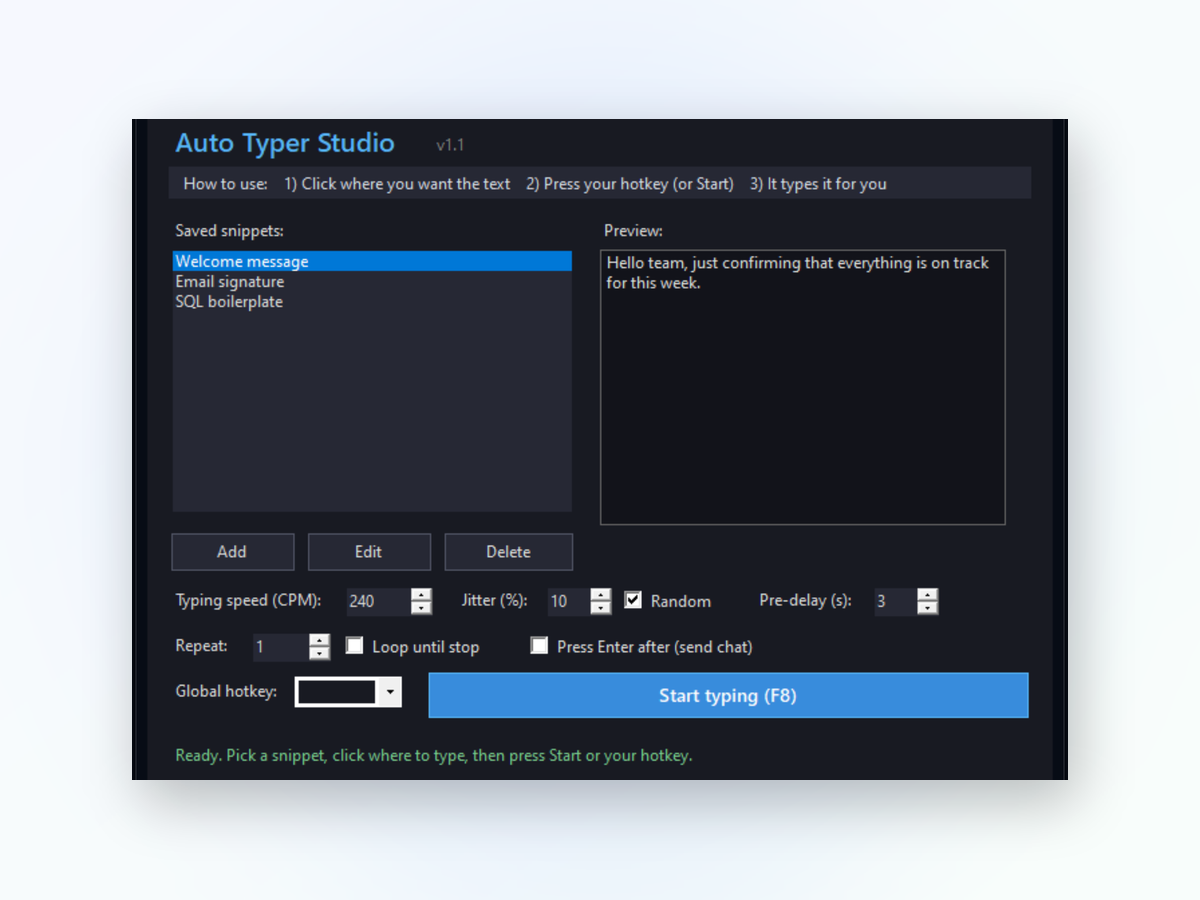
Auto Typer app window on Windows
Better than alternatives

Why use an auto typer instead of copy-paste.

Auto Typer makes typing automation simpler and faster than manual methods.

One keystroke, instant text

Instead of finding and copying text each time, press your hotkey and it types automatically. No clipboard management, no hunting through folders. Your text appears exactly where your cursor is.

Works in any application

Whether you're in email, forms, chat, or spreadsheets, Auto Typer functions the same way. Set it up once and use it everywhere on your PC without special integrations.

No complicated setup

Define a hotkey, enter the text you want to type, and you're done. No coding, no scripting, no command line. The interface keeps things straightforward.

Runs in the background

Auto Typer stays out of your workflow. It sits quietly until you press your hotkey, then types and disappears. No popups or distractions.

Local vs. online

How Auto Typer compares to other methods.

Manual copying and online tools are slower and more limited than having a local auto typer.

Auto Typer

  • Works offline — Always works
  • Speed — One keystroke
  • Works everywhere — Any Windows app
  • Privacy — Stays on your PC
  • No account needed — Launch and use
  • Cost — Free

Typical online tools

  • Works offline — Requires internet
  • Speed — Copy, tab, paste steps
  • Works everywhere — Browser only
  • Privacy — Sent to server
  • No account needed — Sign up required
  • Cost — Subscription plans
Real-world use
Inside the appAuto Typer window

See what Auto Typer handles.

From quick email signatures to multi-line templates, Auto Typer types anything you configure. It works the same way in every application—forms, chats, spreadsheets, or text editors.

Email signaturesPress one key and your full signature appears with correct formatting.
Support responsesCommon replies and canned messages type out instantly when you need them.
Form fieldsFill repetitive information like addresses or account numbers in seconds.
Quick start

How to start using Auto Typer.

Get up and running in a few minutes with these simple steps.

1
Download and open the applicationDownload Auto Typer from this page and run the installer on your Windows PC.
2
Add your first macroOpen the main window, click to add a new macro, and choose your hotkey combination.
3
Enter your textType or paste the text you want Auto Typer to type out when you press that hotkey.
4
Use it immediatelySwitch to any application, press your hotkey, and watch the text appear automatically.
What you get

What you are downloading.

Version1.0
PlatformWindows 10 and 11, 64-bit
InstallPortable, no installer
LicenseMIT, source on GitHub
PriceFree, no account
LanguageEnglish
Questions answered

Common questions about Auto Typer

Can I use Auto Typer in games?

Auto Typer will type in any window, including games, but many games block or ignore text input for security reasons. It works best in applications designed to accept keyboard input.

What happens if I press my hotkey by accident?

The text types immediately wherever your cursor is. Choose distinctive hotkey combinations to avoid accidental triggering, like Ctrl+Alt+number instead of single letters.

Can I store different macros for different purposes?

Yes. You can create as many macros as you need, each with its own hotkey and text. Organize them however makes sense for your work.

Does Auto Typer use much CPU or memory?

No. Auto Typer is lightweight and uses minimal resources. It only activates when you press your hotkey, then returns to idle.

Will it work with my keyboard layout?

Auto Typer uses your system's keyboard layout, so it respects whatever language or layout you have configured in Windows.

Can I include special characters or line breaks?

Yes. You can type anything you can normally type, including special characters, spaces, and line breaks to create multi-line text blocks.

Is my text data stored anywhere?

All your macros are saved locally on your PC. Nothing is uploaded or shared with external services.
Stop retyping the same text over and over.

Download Auto Typer now and reclaim the time you spend on repetitive typing.

Download for Windows
Latest release · v1.0